Miyoo Mini Plus · Onion OS
Sound Lab
A music player, synthesizer, sequencer and drum machine in your pocket. Play its pieces and your own recordings, open any piece and change every note, and watch it all on a live spectrum analyzer.
Install with Mixtape
Mixtape is the app store for Onion OS on the Miyoo Mini Plus. It installs SOUND LAB over Wi-Fi. Mixtape does not list our catalog by itself yet, so add it once by hand:
- Install Mixtape (its install steps), open it once on the handheld, then close it. That creates its settings file.
- Add our catalog. Turn the handheld off and put its SD card in your computer. In a text editor, open
App/Mixtape/data/config.json(the one in thedatafolder) and add this line before the closing}, with a comma at the end of the line above it:The file then looks like this (keep the lines you have; yours may differ):"sources": ["https://slop.kitchen/mixtape/manifest.json"]{ "catalog_url": "https://raw.githubusercontent.com/Producdevity/MiyooMini-Ports/master/ports.json", "github_token": "", "sources": ["https://slop.kitchen/mixtape/manifest.json"] }Already have a
"sources"line? Replace it with this one. - Restart Mixtape. Put the card back, turn Wi-Fi on and open Mixtape.
- Install SOUND LAB from the APPS tab.
Updates then show up in Mixtape by themselves, and your files are kept.
Not in the list? Check the commas and quotes: Mixtape ignores a settings file it cannot read. A copy you installed by hand shows as FOUND: choose REINSTALL once, and Mixtape keeps it up to date from then on, files included.
Free. 17.0 MB. Tested on the Miyoo Mini Plus with Onion OS 4.4. ZIP install steps · Updates keep your projects.
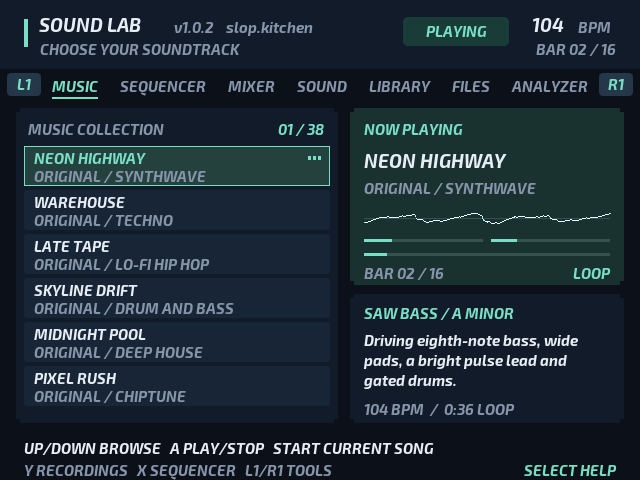
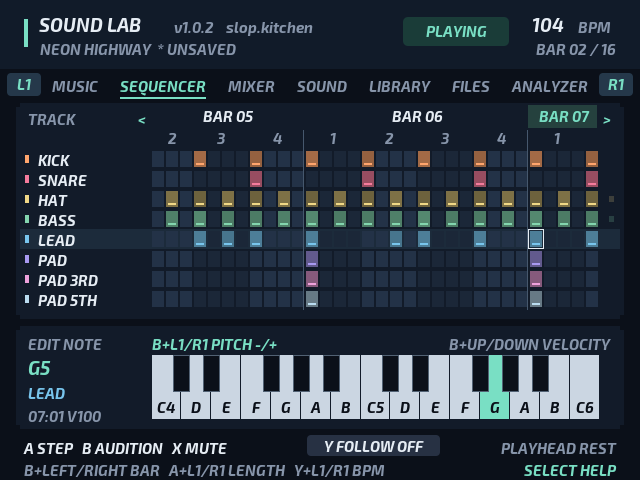
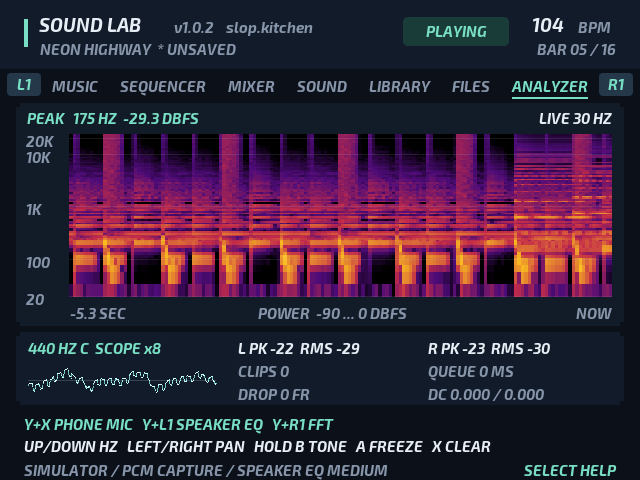
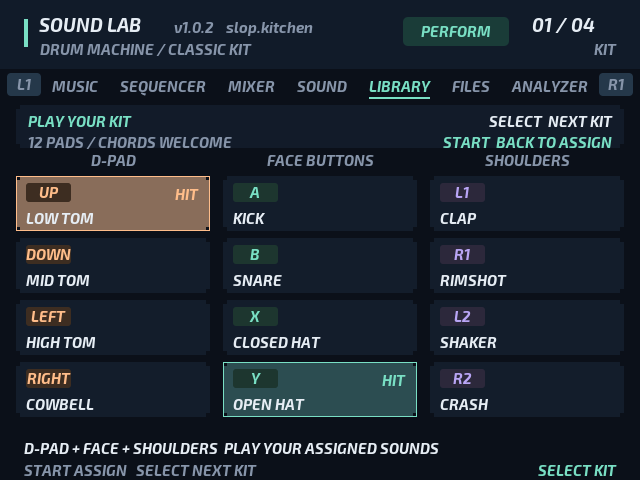
Frames drawn by Sound Lab itself, in its simulator.
Inside
- 38 built-in pieces to play: original synthwave, techno, lo-fi, drum and bass, deep house, chiptune and gothic themes, LAST LIGHT's soundtrack, and Ode to Joy, Bach's Prelude in C and Frère Jacques.
- Recordings: Euphoric Defiance and six loop arrangements of it, and your own MP3 and WAV files.
- An eight-track sequencer for every piece, up to sixteen bars, with a note and a velocity for each step.
- A synthesizer for each track, from chip pulses to a sampled grand piano, and sixteen game-sound recipes to start from.
- A drum machine with twelve pads, 32 sounds and four kits.
- Your work is kept: eight project and eight sound slots, your last session, and WAV exports of loops and sounds.
- Your phone as a microphone on the analyzer, over your own Wi-Fi (experimental; see the privacy policy).
Install from the ZIP
Prefer Wi-Fi? Install with Mixtape: Sound Lab is in its APPS tab, and updates come over Wi-Fi.
- Turn the handheld off, download the zip and put the SD card in your computer.
- Extract the zip to the top level of the card, so its
Appfolder merges with the card's.Windows
Open the zip and copy its
Appfolder onto the card. Choose Replace if asked about Sound Lab's files.macOS
Don't drag the folder in Finder, which can replace the card's
Appfolder. In Terminal, with your card's name in place of SDCARD:unzip -o ~/Downloads/SoundLab-v1.0.2.zip -d "/Volumes/SDCARD"Safari may have already unzipped the download. If it did, copy the contents of the
Appfolder it left in Downloads:rsync -r ~/Downloads/App/ "/Volumes/SDCARD/App/"After the copy finishes, move that Downloads
Appfolder to the Trash so the next update gets the same folder name.Either way, finish by removing the
._files macOS leaves on the card:dot_clean -m "/Volumes/SDCARD"Linux
unzip -o SoundLab-v1.0.2.zip -d /path/to/card - Check that
App/SoundLab/soundlabis on the card, without an extra enclosing folder. - Eject the card, put it back and turn the handheld on.
- Open Apps › Sound Lab. On first launch, Sound Lab brings over your projects, sounds, settings and recordings from the old Ports install.
To update, install the new zip the same way. Your projects, sounds, settings and recordings are kept. Or install it with Mixtape for updates over Wi-Fi.
Volume Start with the handheld's volume low, especially on headphones.
What's new in 1.0.2
Since 1.0.1
- A fresh Apps icon. Sound Lab's four-colour spectrum logo replaces the old waveform, including when selected.
Previously in 1.0.1
Since 1.0.0
- At home in Apps. Open Sound Lab straight from Onion's Apps menu. Your work comes over from the old Ports install.
- Version at a glance. The handheld's top bar shows which build you are running.
Feedback
Found a bug or have an idea? Messages go only to the developers.